Cpt_Kitty_Litter
Member
Edit 1/21/2020: Optifine is 65% complete to being compatible with 1.15.1. As with any update, most of these mods need to update also. As they do, I will do my best to update this thread.
It is hard to go back to playing without these mods installed, and so I've found the way to do this with the newest iteration. Hopefully I can help you install them, too!
First of all, what do these do?
From Optifine's website: "It allows Minecraft to run faster and look better with full support for HD textures and many configuration options. " I use shaders and don't have the most modern pc anymore(i5 6600k and nvidia 970), so I need optifine or my fps is not acceptable. This may enable you to have a smoother experience, too.
VoxelMap. Let me tell you, I avoided using this for awhile. I liked the novelty of the minecraft maps. However, that came to an end as I died a dozen times in a row trying to find all of my gear in the end. I never found that gear, but voxelmap helps that issue by mapping out where I've been and makes deaths and waypoints. It also makes pixel art easier to see from the top down, easier to see mobs, and track players when you are lost in their gigantic bases!
Now that we have visited what they do, let's start on how to get them.
I started with a fresh install of minecraft, but that isn't necessary. Also, if you start with a fresh install, be sure to backup any screenshots, instances, or resource packs.
Now then, let's download the needed files. We need Fabric(loads the mods we will be using), Fabricapi(a set of tools the mods use), Voxelmap, Optifine, and Optifabric(allows optifine to run with fabric).
Fabric - http://fabricmc.net/use/

In this tutorial, we will be installing to Minecraft vanilla. If you use any of the other installations of Minecraft, I would assume know what you are doing. I downloaded the JAR version, and the expert options/snapshot versions are not important. Go ahead and run it after it downloads.

These are the settings I ran with and the default options. Your install location should be similar unless you've used a different letter for your OS's partition(probably ignore this).
Fabric API - https://www.curseforge.com/minecraft/mc-mods/fabric-api/files
I couldn't find this on their official website, but I am sure it is there somewhere. Anyway, curseforge will do.

After you download this, just move/copy it into your mods folder.
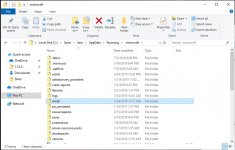
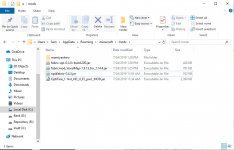
It should be located in C:/Users/[Your PC username]/AppData/Roaming/.minecraft/mods.
You may have to change your folder view settings if you are navigating via explorer.

Click View and then on the right, options. This brings down the only option. Next, click the view tab, and make sure under "Hidden files and folders" the radio button for Show hidden files is marked.
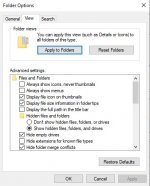
We change this because Windows has the AppData folder hidden by default.
After you've copied the FabricAPI file into the mods folder, run minecraft with the fabric profile.
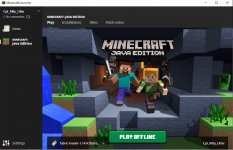
This takes a little bit as it is installing some more files. Specifically, we need access to the configuration folder later, maybe.
So far, we've installed fabric. This really doesn't do much by itself so, lets install some mods. Keep that mod folder open!
VoxelMap - https://www.curseforge.com/minecraft/mc-mods/voxelmap/files
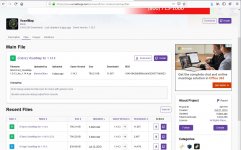
This one is straight forward. We just need to download voxelmap and copy/move it to the mod folder.
So, if you just wanted the map, don't need shaders, and it runs fine. You are done! Enjoy hanging out!
If you need/want optifine, the next post is for you...
It is hard to go back to playing without these mods installed, and so I've found the way to do this with the newest iteration. Hopefully I can help you install them, too!
First of all, what do these do?
From Optifine's website: "It allows Minecraft to run faster and look better with full support for HD textures and many configuration options. " I use shaders and don't have the most modern pc anymore(i5 6600k and nvidia 970), so I need optifine or my fps is not acceptable. This may enable you to have a smoother experience, too.
VoxelMap. Let me tell you, I avoided using this for awhile. I liked the novelty of the minecraft maps. However, that came to an end as I died a dozen times in a row trying to find all of my gear in the end. I never found that gear, but voxelmap helps that issue by mapping out where I've been and makes deaths and waypoints. It also makes pixel art easier to see from the top down, easier to see mobs, and track players when you are lost in their gigantic bases!
Now that we have visited what they do, let's start on how to get them.
I started with a fresh install of minecraft, but that isn't necessary. Also, if you start with a fresh install, be sure to backup any screenshots, instances, or resource packs.
Now then, let's download the needed files. We need Fabric(loads the mods we will be using), Fabricapi(a set of tools the mods use), Voxelmap, Optifine, and Optifabric(allows optifine to run with fabric).
Fabric - http://fabricmc.net/use/
In this tutorial, we will be installing to Minecraft vanilla. If you use any of the other installations of Minecraft, I would assume know what you are doing. I downloaded the JAR version, and the expert options/snapshot versions are not important. Go ahead and run it after it downloads.
These are the settings I ran with and the default options. Your install location should be similar unless you've used a different letter for your OS's partition(probably ignore this).
Fabric API - https://www.curseforge.com/minecraft/mc-mods/fabric-api/files
I couldn't find this on their official website, but I am sure it is there somewhere. Anyway, curseforge will do.
After you download this, just move/copy it into your mods folder.
It should be located in C:/Users/[Your PC username]/AppData/Roaming/.minecraft/mods.
You may have to change your folder view settings if you are navigating via explorer.
Click View and then on the right, options. This brings down the only option. Next, click the view tab, and make sure under "Hidden files and folders" the radio button for Show hidden files is marked.
We change this because Windows has the AppData folder hidden by default.
After you've copied the FabricAPI file into the mods folder, run minecraft with the fabric profile.
This takes a little bit as it is installing some more files. Specifically, we need access to the configuration folder later, maybe.
So far, we've installed fabric. This really doesn't do much by itself so, lets install some mods. Keep that mod folder open!
VoxelMap - https://www.curseforge.com/minecraft/mc-mods/voxelmap/files
This one is straight forward. We just need to download voxelmap and copy/move it to the mod folder.
So, if you just wanted the map, don't need shaders, and it runs fine. You are done! Enjoy hanging out!
If you need/want optifine, the next post is for you...
Last edited: